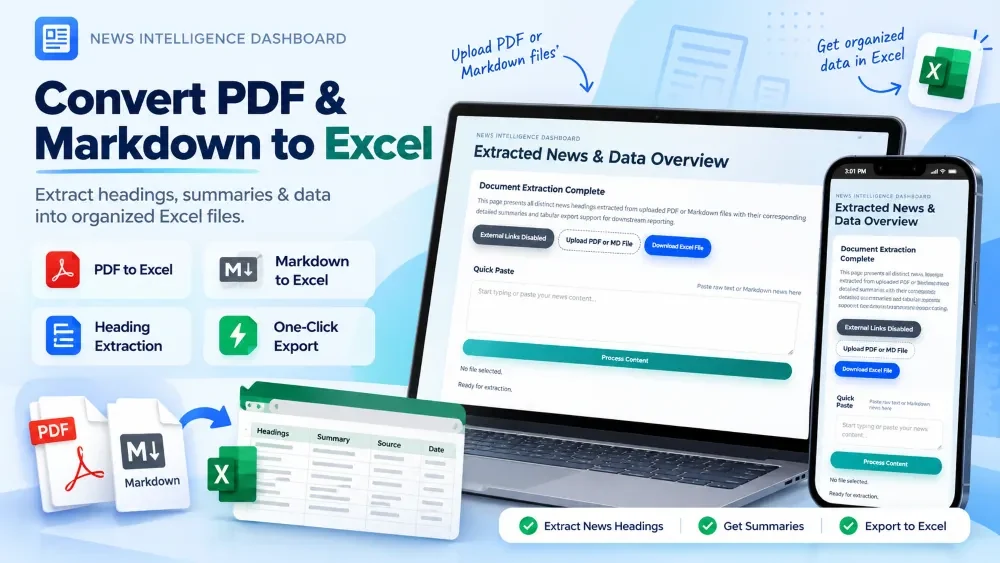
PDF & Markdown to Excel Converter is a web-based document processing tool developed by NetGram Labs for converting structured PDF and Markdown content into downloadable Excel files. Users can upload a document or paste content, review the extracted data, and export it as an Excel file.
PDF & Markdown to Excel Converter is a web-based document processing application developed by NetGram Labs for converting structured content from PDF and Markdown files into an Excel-friendly format.
The main workflow is simple: upload a PDF or Markdown file, let the application process the content, review the extracted information, and download the result as an Excel file.
The tool is particularly useful for documents containing structured text or tabular information where manually copying headings, content, and other details into a spreadsheet would take additional time.
The application provides PDF and Markdown upload, content processing, an extracted-data table, Excel export, and a Quick Paste option for processing text or Markdown directly.
The project was created around a common document-processing task: extracting structured information from documents and arranging it into spreadsheet data can become repetitive when done manually.
When a PDF or Markdown document contains multiple pieces of structured information, manually copying the content into a spreadsheet can take additional time and effort.
Users can upload a PDF file directly through the application.
The application processes the document and extracts the available content into a structured format for review and export.
Markdown Upload
The tool also supports Markdown (.md) files.
This is useful when structured content is already available in Markdown and needs to be converted into spreadsheet data without manually copying the information.
Quick Paste
In addition to file uploads, users can paste raw text or Markdown directly into the application.
This is useful when the content is already available in the clipboard and does not need to be saved as a separate file first.
Content Extraction
After processing the uploaded content, the application extracts the available information and presents it in a structured view.
For supported news or structured content, the extracted data can include headings and related content details.
EXTRACTED DATA PREVIEW
The extracted information is displayed in a table before downloading the final Excel file.
This gives the user a chance to look at the processed data instead of directly downloading an output file without seeing the result.
EXCEL FILE EXPORT
Once the content has been processed and reviewed, users can download the extracted data as an Excel file.
This makes the converted information easier to use for:
Data management
Reporting
Editing
Sorting
Further analysis
Sharing
DOCUMENT CONVERSION WORKFLOW
The application follows a simple process:
text
Upload PDF / MD
       ↓
Read Document
       ↓
Extract Content
       ↓
Process & Structure Data
       ↓
Show Extracted Data
       ↓
Review in Table
       ↓
Download Excel
There is also another option:
text
Paste Text / Markdown
       ↓
Process Content
       ↓
Extract Data
       ↓
Download Excel
The live interface currently provides both the file-upload flow and a Quick Paste option.
News Data Extraction
One of the practical uses of the tool is working with news content.
The application can process structured news content and present extracted headings and related details in a table for review and Excel export.
For example, a document containing multiple news items can be converted into structured spreadsheet data instead of keeping the information only inside the original PDF or Markdown file.
EXTRACTED DATA PREVIEW
Before exporting, the processed information can be reviewed directly inside the application.
The interface provides two ways to look at the extracted data:
Grid View
Excel-Style Table
These views allow users to check the extracted information before downloading the Excel file.
DESIGN & USER EXPERIENCE
The interface was designed around the document conversion workflow rather than adding unnecessary features.
The important actions are visible directly:
Upload PDF or MD
Paste content
Process content
View extracted data
Download Excel
The goal was to keep the workflow straightforward so users can understand the main actions without unnecessary complexity.
DEVELOPMENT CHALLENGES
Extracting Structured Information
PDF and Markdown files can represent information in different structures and formats.
The application needs to read the input and convert the available content into structured data that can be represented properly in rows and columns.
Keeping the Output Useful
Simply extracting text isn't enough if the final Excel file is difficult to use.
The extracted information therefore needs to be organized before it is presented in the table and exported.
Supporting Multiple Input Methods
Some users already have a file, while others may simply have the Markdown or text content copied.
Adding both file upload and quick paste makes the tool more practical for different workflows.
DEVELOPMENT PROCESS
The project was built around a small and focused workflow:
Create the upload interface
Add PDF support
Add Markdown support
Add quick-paste input
Process the uploaded content
Extract useful information
Structure the extracted data
Display the result in a table
Add Excel export
Test different document inputs
Deploy the production version
NETGRAM LABS CONTRIBUTION
NetGram Labs designed and developed the document conversion tool, including the upload workflow, document processing, data extraction, structured data preview, Excel export, responsive interface, and production deployment.
Frontend development
UI implementation
File upload handling
PDF processing
Markdown processing
Content extraction
Data structuring
Table view
Excel export
Responsive interface
Testing and improvements
Deployment
Project Outcome
The final application provides a practical workflow for converting supported document content into a structured spreadsheet format.
Instead of manually copying information from a PDF or Markdown file into Excel, users can upload or paste the content, process it, review the extracted data, and download the resulting Excel file.
The tool is particularly useful when structured document or news content needs to be reviewed, organized, and exported for further spreadsheet-based work.